
 EN
EN  SW
SW  TL
TL 
If you’re ready to unlock everything Xprizo has to offer, the first step is setting up your account properly. From sending and receiving money to topping up your wallet and accessing agent services, completing your profile ensures a smooth and secure experience. It only takes three simple steps—creating your account, filling in your details, and completing your KYC. In this guide, we’ll walk you through the entire process so you can get started with confidence.
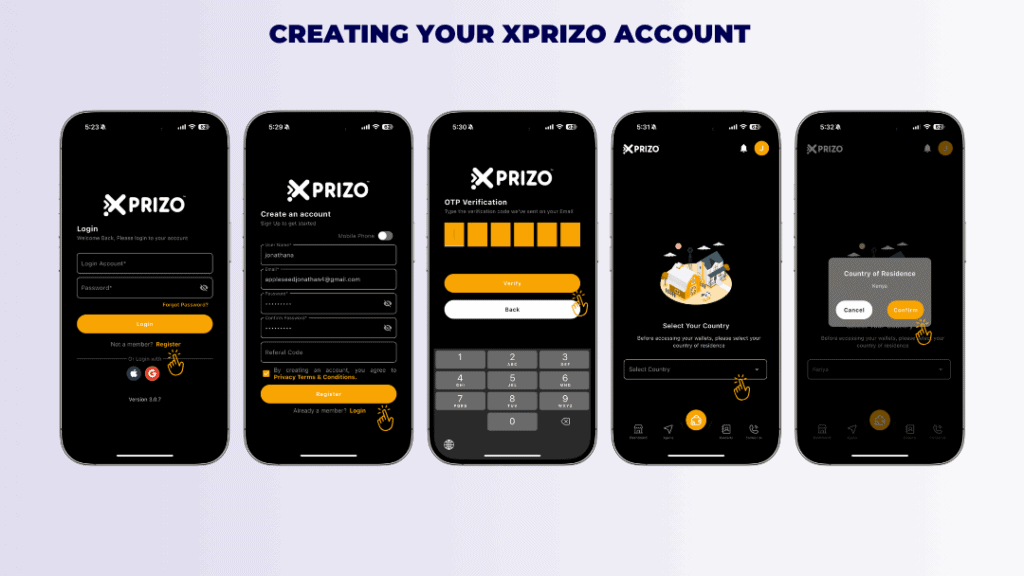
Creating your Xprizo account:
- Download the App from the Google PlayStore or Apple App Store
- Open the App & Tap on Register
- Fill all the required fields as shown on your screen. You will need to provide a username and email address. If you’d like to sign-up via mobile, then switch to mobile via the toggle button. If you have a referral code, enter it before continuing.
- Enter a new password for your account and confirm your password. Choose a secure, memorable password.
- To confirm your email or mobile number, you will receive a validation code via email or SMS. Enter the code to validate your email or mobile number.
- Once you are done, you can now login to your Xprizo account
- Then you will be asked to choose your country: Select your country of residence from the dropdown menu and confirm.
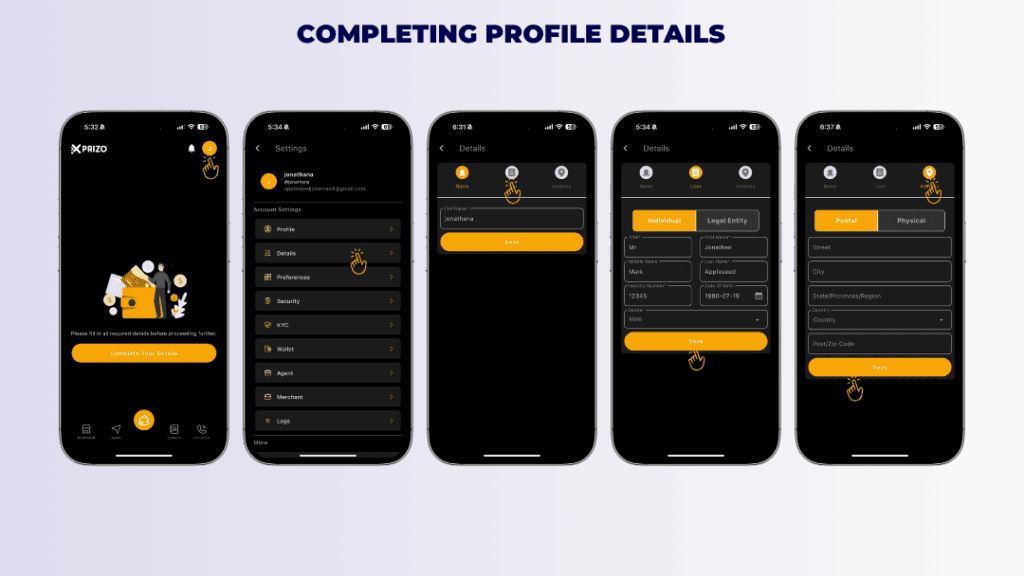
Completing Your Profile
- Open the Xprizo App & access the account settings by clicking on the profile picture icon located at the top right corner.
- Click on “Details” to access the profile details section then click on User.
- Click on the User tab and fill in your official name, date of birth, and your ID/Passport number then Click Save.
- Click on the Address tab and fill in full address then Click Save.
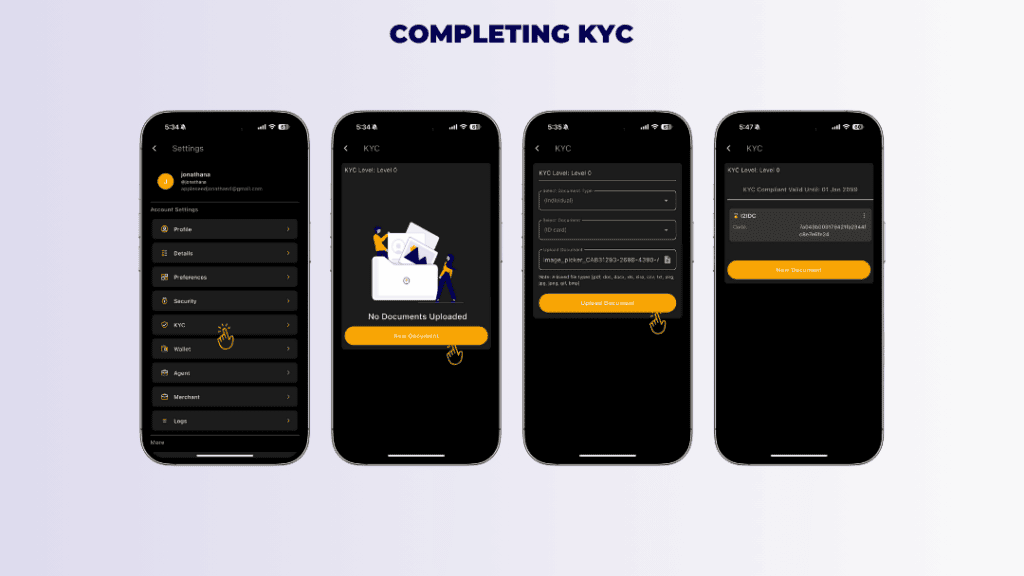
Completing Xprizo’s Level 1 in Xprizo’s App
- Open the Xprizo App & access the account settings by clicking on the profile picture icon located at the top right corner.
- Click on “KYC” to access the KYC section within the profile.
- Initiate the KYC process by clicking on “New Document” and provide all required document details along with the necessary documents.
- Next, select the document type and document, then upload the corresponding document file. Once done, click on the “Upload” button to submit the document for KYC approval.
- Click on the ellipsis and select preview to preview the document uploaded.
- Once the back office approves the KYC and the KYC documents, the status will change to “Complete.”
And that’s it—your Xprizo account is now fully set up and ready to go! If you need any help along the way or have questions about your account, our team is here for you. You can reach out by clicking here, sending us an email at contact@xprizo.com, or calling us directly at +254 757 786 037 or +254 701 659 595. We’re always happy to help!